
From the street, a data centre might look like a warehouse, a multi-storey office building or a large industrial complex. Inside, the appearance changes completely: long rows of tall metal cabinets, neatly arranged cables, blinking indicator lights and machinery that keeps thousands of computers operating.
Those cabinets are called server racks. Each can hold multiple computers, storage devices and network switches, stacked horizontally rather than arranged like conventional desktop computers.
An AI data centre can look almost identical from outside. The differences become clearer when you examine the equipment inside: powerful computing systems, high-speed connections between processors and, in some designs, liquid-cooling pipes that carry heat directly away from the chips.
The easiest way to understand what a data centre looks like is to follow it from the outside in, using real Australian facilities and equipment as examples.
What does a data centre look like from the street?
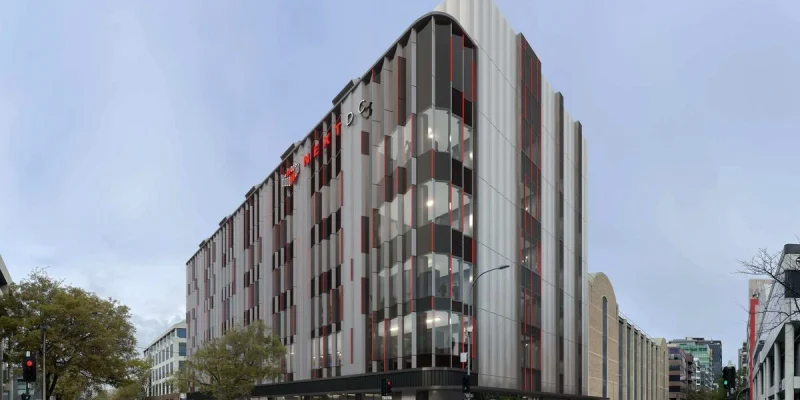
A useful Australian example is NEXTDC’s A1 data centre in Adelaide, designed by architects Hames Sharley.
Rather than resembling a plain industrial shed, the building has an angular façade inspired by the sawtooth roofs of older industrial buildings in the surrounding precinct. Different coloured surfaces become visible depending on where you stand.
From the street, someone unfamiliar with the building might reasonably mistake it for an office development or another type of commercial facility.
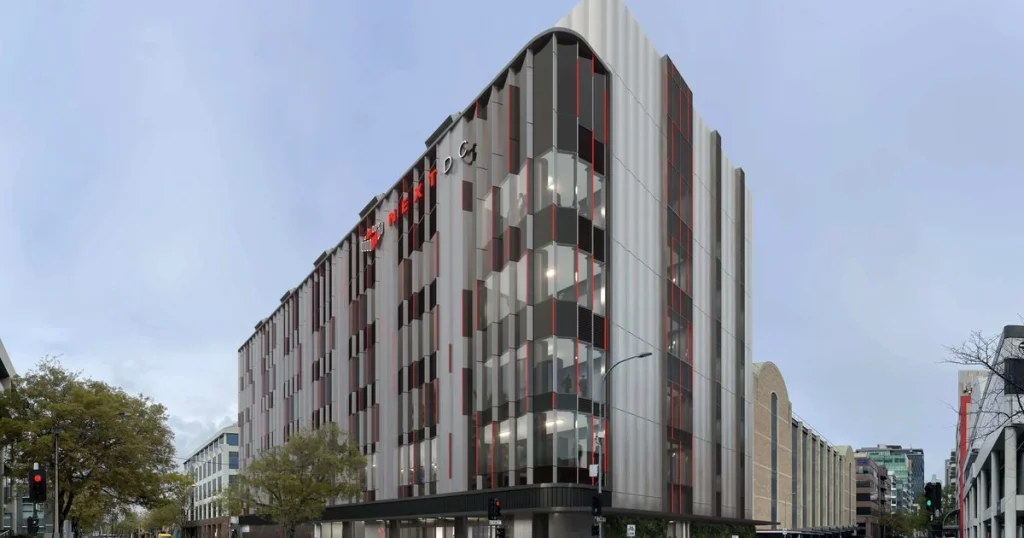
NEXTDC’s A1 data centre in Adelaide demonstrates how modern computing infrastructure can resemble a contemporary commercial building. Its distinctive façade draws on the industrial architecture of the surrounding area. Source: Hames Sharley.
Compare this with a larger data centre campus.
In Google’s data centre photo gallery, some facilities appear as expansive industrial buildings surrounded by roads, service areas and mechanical equipment.
From above, the size of the supporting infrastructure becomes clearer. Cooling equipment, electrical installations and service areas can occupy substantial space around the main buildings.
This highlights an important point: the exterior of a data centre rarely tells you exactly what computing equipment is operating inside.
A large building isn’t necessarily an AI data centre. A modern façade doesn’t indicate how many servers are running. And two facilities with similar exteriors may use very different electrical and cooling systems.
How can you recognise a data centre from outside?
There isn’t one feature that identifies every data centre, but several visual clues can help.
| Exterior feature | What it might indicate |
|---|---|
| Large, relatively plain buildings | Space for computing equipment and supporting infrastructure |
| Few conventional office windows | Areas designed primarily for machinery and equipment |
| Outdoor cooling fans or mechanical equipment | Systems that help remove heat from the building |
| Large generators or electrical installations | Backup power and electricity distribution equipment |
| Fenced service yards and controlled entrances | Security and restricted access to critical infrastructure |
| Several similar buildings on one site | A campus containing multiple data halls or supporting facilities |
None of these characteristics proves that a building is a data centre. Warehouses, hospitals, factories and telecommunications facilities can have similar features.
The building’s documented purpose is a more reliable way to identify it.
For an Australian construction perspective, Mayfair Building Group’s guide to base-building works explains how essential infrastructure, including electrical systems, pumps and heating and cooling equipment, supports the operation of commercial buildings.
Although data centres have specialised requirements, the same broad principle applies: much of a building’s important infrastructure isn’t immediately visible from outside.
What do you see inside a server hall?
Imagine standing at the end of a supermarket aisle, except that the shelves on both sides have been replaced by tall metal cabinets.
That repeated arrangement gives a server hall its distinctive appearance.
Some racks have perforated metal doors. Others appear as open frames containing horizontal equipment trays. The machines often have small status lights, ventilation openings, handles and network connections.
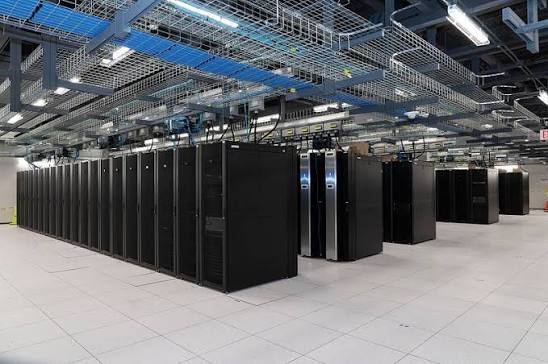
Inside a typical data centre, computers and networking equipment are arranged in rows of tall racks. The layout helps organise equipment, cabling, maintenance access and airflow.
A rack and a server aren’t the same thing.
- A rack is the frame or cabinet holding the equipment.
- A server is a computer installed within the rack.
- A network switch connects computers so they can exchange information.
- A storage device holds information used by computing systems.
One cabinet may contain many servers, so counting racks in a photograph won’t tell you how many computers are operating.
How to identify equipment in a server rack
| What you can see | What you’re looking at | What it does |
|---|---|---|
| Narrow horizontal metal units | Servers, storage devices or network switches | Process, store or transmit information |
| Small indicator lights | Equipment status indicators | Show operating conditions or connection activity |
| Bundles of network cables | Data connections | Connect servers and networking equipment |
| Thick power cables | Electrical connections | Supply electricity to equipment |
| Perforated cabinet doors | Ventilation panels | Allow cooling air to pass through |
| Pipes and connectors near computing trays | Liquid-cooling connections | Help transfer heat away from components |
One useful distinction is between the front and rear of a rack.
The front often provides access to removable equipment, status indicators and ventilation openings. The rear may expose more power connections, network cabling and cooling infrastructure.
This explains why two photographs of the same rack can look surprisingly different.
The front shows how equipment is arranged. The rear often reveals more about how it is connected, powered and cooled.
Why do some server aisles have doors?
Some server halls contain transparent doors or partitions that make the rows resemble glass corridors.
These are often part of an aisle containment system, which helps control the movement of cooling air.
Servers generate heat as they operate. In a typical air-cooled arrangement, cooler air enters one side of the equipment, passes through it and leaves as warmer air.
If warm exhaust air mixes with the incoming cool air, the cooling system may need to work harder to maintain suitable operating temperatures.
To reduce this mixing, data centres commonly arrange racks around two types of aisle:
- Cold aisle: where equipment draws in cooler air.
- Hot aisle: where warm air leaving the equipment collects.
Depending on the design, either aisle may be enclosed.
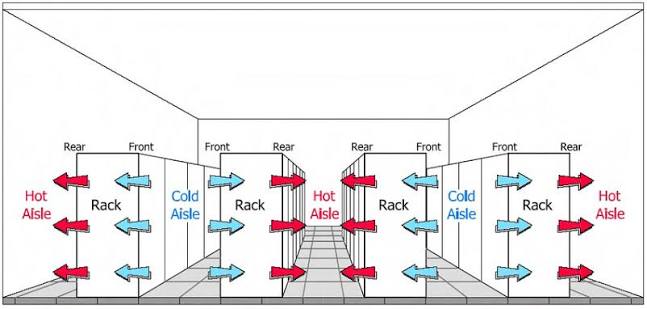
A typical air-cooled server hall separates cooler supply air from warmer exhaust air. Aisle containment helps reduce mixing between the two.
The doors themselves don’t explain the cooling system. The important detail is the direction of airflow.
This also explains why server halls look so orderly. Rack positioning isn’t simply about tidiness. It helps engineers manage heat, maintenance access and airflow.
The US Department of Energy’s data centre design guide provides further technical information about airflow and cooling efficiency.
What does an AI data centre look like inside?
At first glance, an AI data centre can look much like a conventional data centre.
Both may contain long rows of racks, network cabling, electrical equipment and cooling systems.
The differences become easier to understand when you look at what is installed inside the individual racks.
Conventional servers can run websites, databases, business applications and storage systems. AI computing systems may contain large numbers of graphics processing units, or GPUs, designed to work together on demanding calculations.
These processors aren’t normally visible from the front of a closed rack. They sit inside computing trays alongside other components.
One example is NVIDIA’s GB200 NVL72 system.
In its single-rack configuration, it contains:
- 72 Blackwell GPUs.
- 18 computing trays, each containing four GPUs.
- Nine NVLink switch trays connecting the computing equipment.
- Power distribution equipment.
- Liquid-cooling manifolds and associated connections.
The NVIDIA DGX GB hardware guide provides diagrams illustrating how these components fit together.
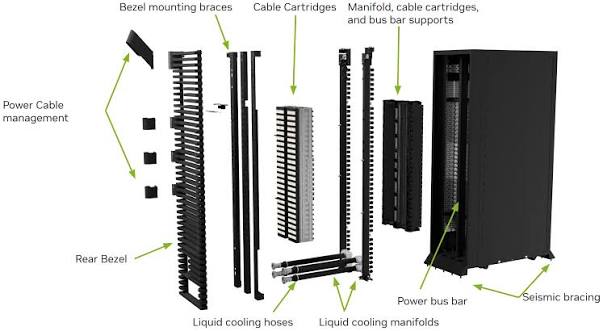
An NVIDIA GB200 NVL72 rack contains computing trays, networking equipment, power infrastructure and cooling connections. The rear view reveals systems that may not be obvious from the front. Source: NVIDIA.
The cooling arrangement is particularly revealing.
In this system, liquid circulates through cold plates attached to the CPUs and GPUs. The liquid collects heat from those components before returning through the cooling system.
Other components continue to use air cooling.
That makes the equipment different from a conventional server installation relying entirely on air cooling, although liquid cooling isn’t exclusive to AI facilities.
For a more detailed explanation of how cooling systems manage heat, see our article on why data centres need water.
It explains the difference between circulating cooling water and water actually consumed by a facility, including how different cooling arrangements can affect overall water demand.
What is the visual difference between a regular data centre and an AI data centre?
| What you’re comparing | Conventional server setup | High-density AI setup |
|---|---|---|
| Front of the rack | Horizontal servers, storage and network equipment | Horizontal compute trays and network equipment |
| Computing hardware | Often general-purpose CPUs, with GPUs where needed | May contain many interconnected GPUs |
| Connections | Power and network cabling | Power, networking and potentially specialised GPU interconnects |
| Cooling | Often air cooling, sometimes liquid cooling | May use direct liquid cooling for high-density components |
| Appearance from outside | Warehouse, commercial building or campus | Often indistinguishable from a conventional data centre |
The important point is that there is no single visual feature that proves a facility is designed for AI.
A cooling pipe doesn’t automatically indicate AI computing. A large building doesn’t reveal its GPU capacity. And a dense rack of equipment can support many different workloads.
The defining differences lie in the hardware and how it operates, rather than the outward appearance of the building.
What’s in the building besides the servers?
Server cabinets may be the most recognisable part of a data centre, but they’re only one part of the facility.
Other areas can look more like industrial plant rooms or electrical substations than computer rooms.
Cooling and mechanical rooms
A mechanical plant room may contain pumps, valves, insulated pipes, heat exchangers and equipment used to remove heat from the computing systems.
For example, a chilled-water system can carry heat from inside the building to equipment that transfers it elsewhere.
Not every data centre uses the same cooling arrangement.
Some rely heavily on air cooling, while others use liquid cooling, refrigeration or a combination of systems.
It’s also important to distinguish between water circulating inside the cooling system and water consumed through evaporation or other losses.
Our detailed guide to data centre water use and cooling systems explains these differences, including why a closed-loop cooling system doesn’t necessarily mean a facility consumes no water.
From a building perspective, mechanical rooms must also accommodate maintenance access, equipment replacement, pipework and other services.
These considerations are relevant well beyond data centres. Mayfair Building Group’s commercial plumbing and maintenance services cover building systems, preventative maintenance and associated plumbing infrastructure.
The scale of a data centre’s mechanical systems is different, but reliable access and maintenance planning remain important considerations.
Electrical rooms and backup power
Another part of the building contains electrical infrastructure.
Instead of server racks, you may see switchgear, distribution cabinets, uninterruptible power supply equipment and associated electrical connections.
These systems distribute electricity and help maintain equipment operation through certain power interruptions.
Backup generators may be located outside or in dedicated areas. They can be among the most noticeable pieces of infrastructure around a data centre.
It’s worth distinguishing generators from cooling fans. Both may be large and visible, but they serve different purposes and don’t necessarily operate under the same conditions.
This difference matters when considering what a neighbouring data centre might sound like.
Our article Are Data Centres Noisy? explains the sounds produced by cooling fans, pumps, chillers and backup generators, and why the noise reaching nearby properties depends on the facility’s equipment and layout.
How the different parts fit together
A useful way to picture a data centre is as three connected systems:
- Computing equipment processes, stores and exchanges information.
- Electrical infrastructure supplies the electricity the equipment needs.
- Cooling infrastructure removes the heat generated as equipment operates.
The building houses and protects these systems while providing access for installation, maintenance and future changes.
This is why a data centre is more complex than a warehouse filled with computers.
Its supporting infrastructure is essential to keeping those computers operating reliably.
Can you see inside a real data centre?
Yes, although access to operational facilities is commonly restricted for security and operational reasons.
You can still explore real examples through published photographs, equipment diagrams and virtual tours.
Google offers a 360-degree tour of its data centre in The Dalles, Oregon, along with a photo gallery featuring server equipment, cabling, buildings and cooling infrastructure.
For an Australian exterior, the NEXTDC A1 Adelaide project photographs show how a data centre can be incorporated into an urban setting.
And for a detailed look at an AI rack, NVIDIA’s hardware diagrams help identify compute trays, switches, cooling connections and power equipment.
Five things to look for in data centre photographs
If you’re trying to understand a photograph, start with these questions:
- Am I looking at the building, a server hall or a mechanical room? Each has a different purpose.
- Where are the actual computers? Look for horizontal trays installed inside tall cabinets.
- Which side of the rack am I seeing? The rear often reveals more cabling and cooling connections.
- How is heat being removed? Look for ventilation arrangements, cooling pipes, containment doors and external cooling equipment.
- What can the photograph actually tell me? It may reveal equipment and layout, but usually won’t establish processing capacity, energy consumption or whether the facility is running AI workloads.
These questions help distinguish what is visible from what requires technical documentation.
Why the appearance of a data centre matters in building design
For builders, property owners and project teams, a data centre’s appearance reveals more than its architectural style.
The positioning of cooling equipment affects how heat leaves the site. Electrical infrastructure influences space requirements and service access. Building layout can affect maintenance, equipment replacement and the relationship between the facility and neighbouring properties.
For example, a cooling system located on a roof may create different construction and access requirements from one located in an external plant yard.
Likewise, generators positioned near neighbouring buildings may require different acoustic treatment from equipment positioned farther away or screened by the building itself.
These are not decisions that can be made purely from the appearance of the finished facility. They require coordination between building designers, engineers, contractors and specialist equipment suppliers.
Mayfair Building Group’s project management services explain the broader importance of planning, scheduling, procurement and coordination across commercial construction work.
For specialised facilities such as data centres, these considerations become particularly significant because the building and its technical systems must work together.
What does a data centre actually look like?
From outside, a data centre may resemble a warehouse, modern commercial building or collection of industrial facilities.
Inside, its most recognisable feature is the server hall, where rows of metal racks hold computers, network equipment and storage systems.
Beyond those racks are the electrical and mechanical systems that keep everything operating.
AI data centres can appear much the same, although their computing racks may contain more densely interconnected processors and specialised cooling equipment.
The most useful way to understand a data centre photograph is to look beyond the cabinets themselves and follow the connections between the computers, their electricity supply and the equipment that removes heat.
Once you know what those systems do, the building’s appearance starts to make considerably more sense.